It’s that time again — the BC 2026 Wave 1 release plan is out, and like every wave there’s a pile of features competing for attention. I’ve been reading through it with a notebook open, and three items kept jumping back at me. Not because they’re individually the most exciting (though some of them are), but because together they tell a pretty clear story about where Microsoft is heading with agents in Business Central. And there’s a fourth thread — a quiet engine swap — running underneath all of it.
Here’s the pattern: this wave delivers an agent capability for every persona in the BC world. Power users and consultants get a way to build agents. End users get a ready-made agent that uses AI for them. And developers get an MCP server that helps debug the things we build. Underneath, the model itself is being swapped to GPT-5.3-chat. One wave, three personas, one engine upgrade, no one left out.
Let me walk you through each.
Agent Designer — For the Builders
Public Preview Feb 6, 2026 · GA May 2026
This is the one I’ve personally been waiting for. The new in-product agent design experience ships with the AI Development Toolkit for Business Central, and it does exactly what the name promises: lets you envision, prototype, and iterate on custom agents — directly inside BC, in a sandbox, without writing AL.
You define your agent’s behavior in natural language. You set instructions, profiles, and permissions. You test against real BC data, but in a safe environment. And once you’ve got something working, you can export the agent definition as a JSON file — meaning you can drop it into GitHub, version-control it, share it across sandboxes, and treat it like any other artifact in your delivery pipeline.
For consultants, product owners, domain experts, and yes — even power users — this is the missing link. Until now, customers wanting their own agents in BC needed a developer who knew the runtime APIs. With Agent Designer, the prototype phase moves to the people who actually understand the business scenario. Devs still get involved when things go to production, but the validation loop is dramatically shorter.
A nice touch: the designer also includes a detailed troubleshooting view so you can see what the agent reasoned over, why it made a decision, and where uncertainty crept in. That’s how you tune instructions without flying blind.
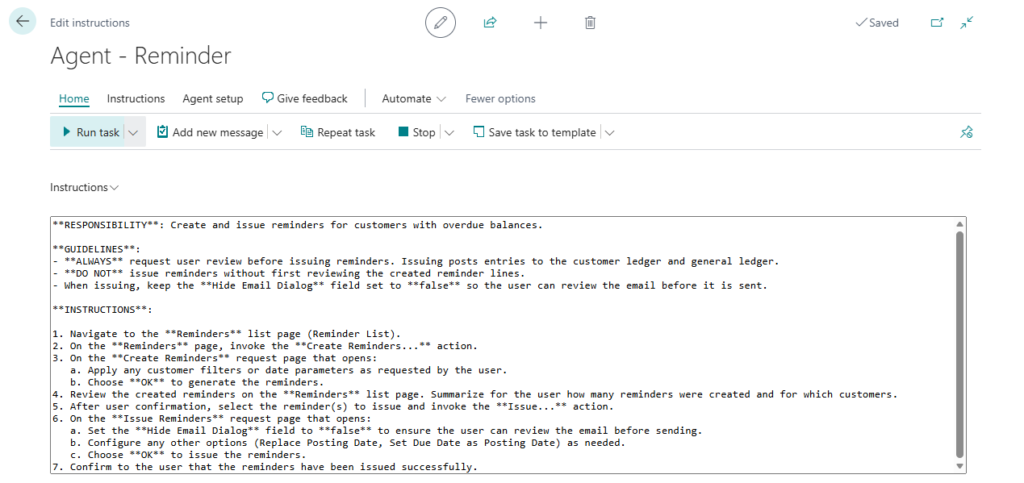
What I like most here isn’t the feature itself — it’s the philosophy. Microsoft is treating agents as something you design, not just something you consume. That’s a meaningful shift.
Expense Agent — For the Users
Public Preview May 2026
If Agent Designer is for builders, Expense Agent is for the people who fill out expense reports — meaning, basically everyone in your company.
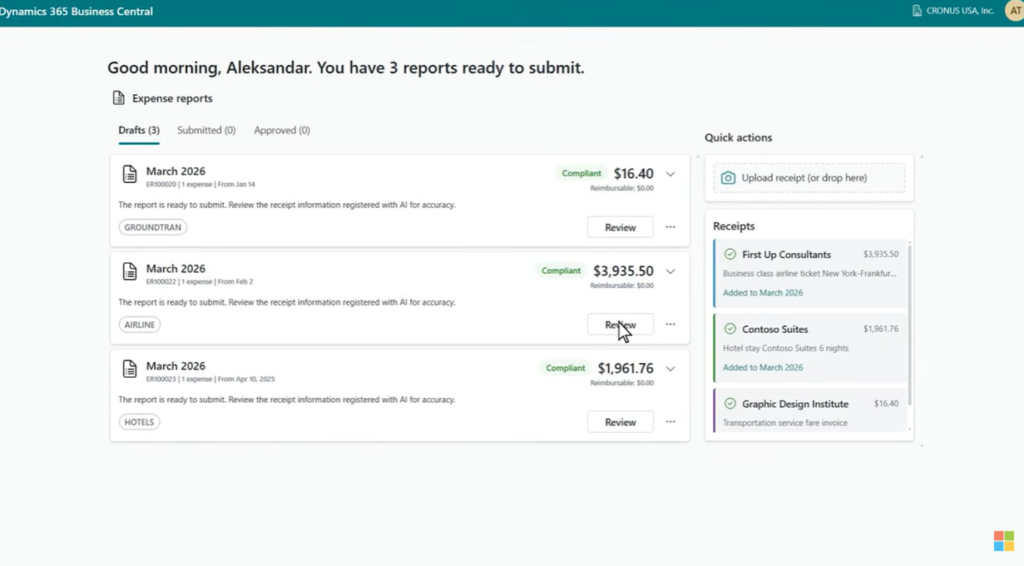
This isn’t a thin AI veneer over an existing form. It’s a brand new web app that captures receipts via email, camera, or direct upload, and uses a language model to extract category, amount, currency, merchant, payment method, date, receipt number, and a context-based description. It can itemize complex receipts, calculate per diems from itineraries, and detect anomalies and duplicates. Approval workflows, policy validation, and reminders are built in. Posting and ledger entries land back in BC.
The integration story is what makes this practical: the Expense Agent works through a web app, Outlook, and Microsoft 365 Copilot Chat. Three places employees already are. No “please log in to BC to submit your expenses” friction.
Activation is simple — run Configure Expense Agent in BC, follow the guided setup for categories, subcategories, and posting groups, and you’re handed a link to the web app. From there the agent does the heavy lifting and groups expenses into Expense Reports automatically.
One caveat to flag: at preview the Expense Agent is English-only and US-only, with Australia, New Zealand, and UK following in July 2026. No mention of Germany or the wider EU yet, so if you’re a Central European partner like me, this is one to watch — not deploy on day one.
Troubleshooting MCP Server for AL — For the Devs
Public Preview & GA April 2026
This one I want to call out because it’s specifically for us — AL developers. And it’s properly clever.
The Troubleshooting MCP Server kicks in during an active AL debugging session in VS Code, when execution is paused at a breakpoint or runtime error. At that moment, GitHub Copilot (or any other coding agent) can talk to the MCP server and reason over your live execution state — not static code, but what’s actually running.
That means the agent can pull the full call stack to explain how execution got where it did. It can inspect variable state across stack frames, including locals, globals, and complex types. It can retrieve source code for the relevant frame — even system and framework code — without you manually navigating files. And it can place breakpoints programmatically based on its analysis to dig deeper into hard-to-reach areas.
In short: you stop being the only one who can read the call stack. Your coding agent reads it with you.
Microsoft is clear that this complements rather than replaces traditional debugging. Step-through is still the right tool for simple bugs and for learning the codebase. The MCP server earns its keep on the gnarly stuff — multilayered scenarios, deep call chains, subtle state issues that hide between frames.
This is the kind of feature that doesn’t make the marketing slides but quietly becomes indispensable two months in.
The Engine Swap Underneath It All
Buried in the wave notes is something that affects every agent in BC — built-in and custom: from May through June 2026, Copilot in Business Central is upgrading to GPT-5.3-chat as the new default model for version 28 and onwards. The rollout is gradual across regions, with the UK, India, and Australia coming later.
Three things matter here.
First, the model upgrade itself promises improved quality and performance for everything Copilot does in BC — agents included. From a usage perspective, no action is required on your part. It just happens.
Second, there’s a new model transparency UI showing which model your custom agents are running on, and letting you pick your preferred model. The model rollout and the selection UI travel on separate tracks, so you might see GPT-5.3-chat in your environment before the picker shows up. That’s expected — Copilot keeps working in the meantime.
Third — and this is the one for us code people — there are new AL methods for programmatic model selection. When you’re coding an agent, you can now control which model it uses directly from AL. That’s a meaningful unlock for partners who need different models for different scenarios — cost-tuning, reasoning depth, regional constraints, fallback strategies.
But here’s the part I’d flag for anyone already deep in agent prototyping: once your environment receives the model update, re-evaluate your agents. Microsoft says this directly, and it’s good advice. A model swap can shift how an agent reasons, what it picks up from your instructions, and how accurate it is on your specific scenarios. The agents you tuned last month against the old model aren’t necessarily the same agents next month. That’s not a flaw — it’s the nature of building on top of LLMs.
Treat it like any other dependency upgrade: re-test, re-measure, adjust your instructions if needed. If you’ve been waiting for a reason to set up a proper evaluation harness for your agent prompts, this is it.
The Layered Architecture Bet
Reading these four release notes side by side, the architectural strategy clicks into place. Microsoft is explicitly separating concerns:
In-product agent execution lives inside BC. Transparent, permission-bound, audit-trailed, financially safe. The agent runtime, the Agent Designer, the Sales Order/Payables/Expense agents — all part of this layer.
Cross-system orchestration lives in Microsoft 365 Copilot Studio and M365 Declarative Agents. BC will eventually expose its agent capabilities as MCP tools, and the higher-level Declarative Agents will orchestrate end-to-end processes across products.
And the model layer sits underneath both, swappable by the platform, increasingly observable and controllable from your own code.
That’s a layered design, not a monolithic one. And for ERP — where a wrong move means a wrong posting — that separation is exactly right. You want the deep, controlled execution close to the data, the broad orchestration above it, and the model abstracted enough that an upgrade like GPT-5.3-chat lands without breaking your stack. All three layers speak MCP. All three compose.
My Take
Wave plans are usually a mixed bag — some features land, some get delayed, some quietly disappear. But the direction this one points in is unambiguous: agents are no longer a single feature in BC. They’re becoming a layer of the product, with a design experience for partners, consumer-grade agents for end users, developer tooling that catches up to the rest of the modern AL stack — and a model substrate that the platform will keep upgrading on you whether you’re ready or not.
That last part is the quiet lesson here. If you’re building agents seriously, you need an evaluation discipline. The model will move. Your prompts and instructions will need to move with it.
If you’re a partner, the Agent Designer is the one to start playing with as soon as preview opens. If you’re a finance lead, watch the Expense Agent rollout to your region. If you’re an AL dev, the MCP server is going to change how you handle the painful 5% of bugs that eat 50% of your week. And if you’re already coding agents — get ready for May, and have a re-evaluation plan in your pocket.
Three features, three personas, one engine swap. That’s a good wave.
Discover more from Lubenheimer
Subscribe to get the latest posts sent to your email.