I went looking for something else entirely and fell into this instead.
I wanted a clean answer to a question a colleague asked me: which Copilot features in Business Central are safe to put in front of a customer’s production users? Reasonable question. Should be a five-minute answer.
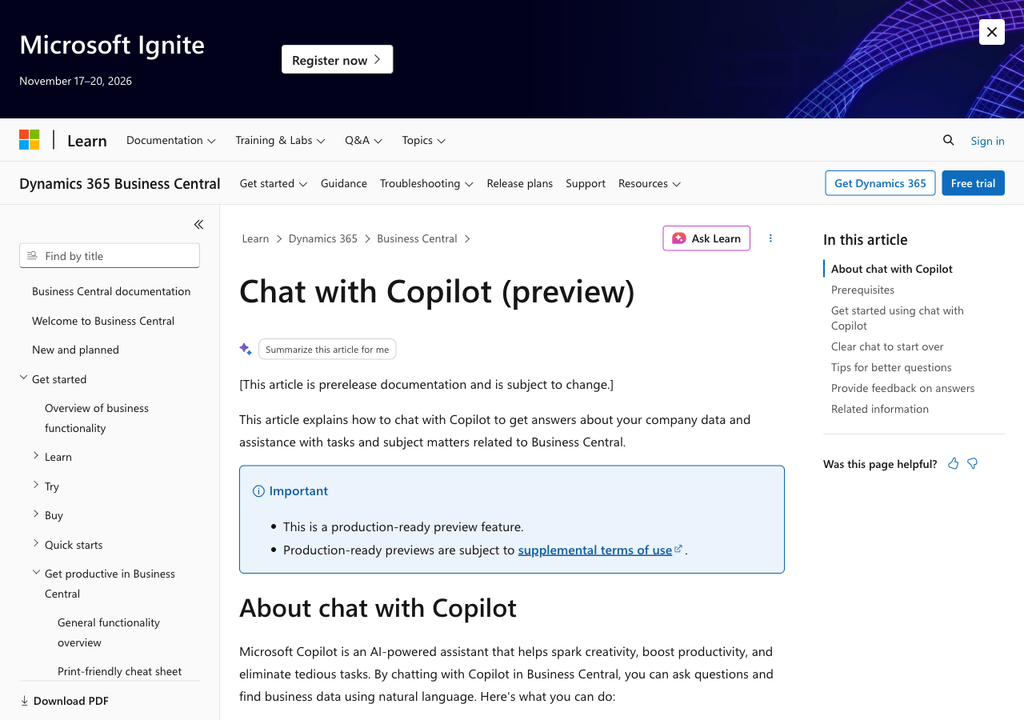
It took considerably longer than five minutes, and the answer surprised me enough that I think it’s worth an article. Because when you check every feature page individually rather than trusting the marketing surface, seven of the ten features in Microsoft’s availability table are still labelled preview. Chat is one of them. It has been in preview since at least November 2024, and Microsoft has never published a GA date for it.
Let me show you how I got there, because the method matters more than the number.
How I checked
I didn’t want a single source, because a single source is how you get this wrong. I checked three independent signals for each capability:
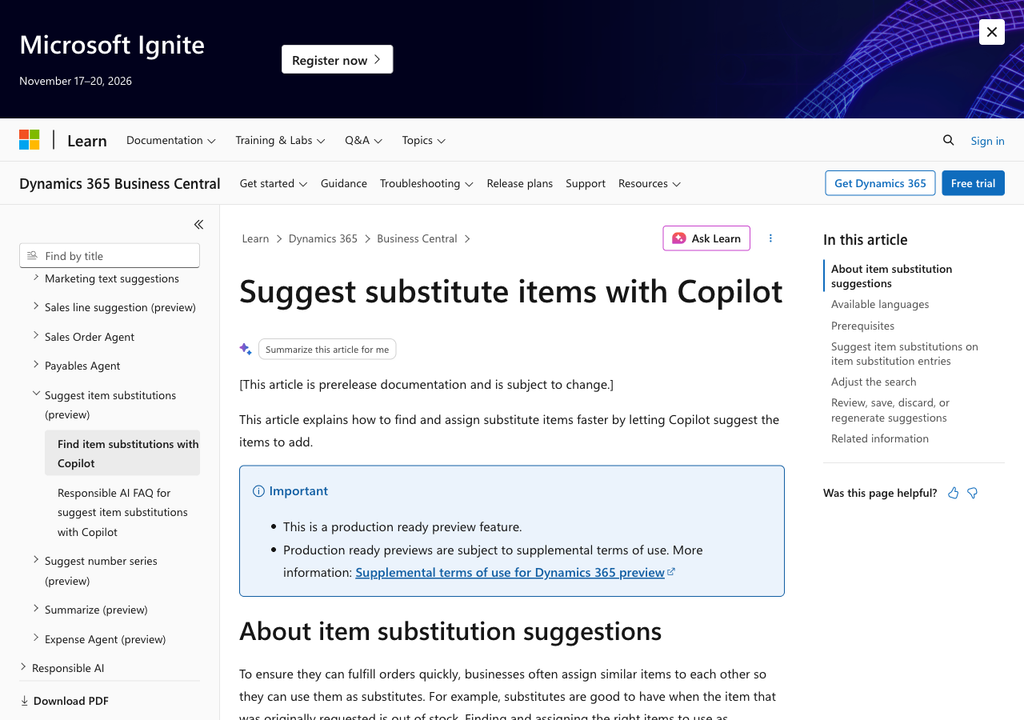
The H1 of the published documentation page — Microsoft usually puts “(preview)” right in the title. The presence of the prerelease banner in the live page HTML, which reads “[This article is prerelease documentation and is subject to change.]” And the release plan tables, where the General availability column either has a date or a dash.
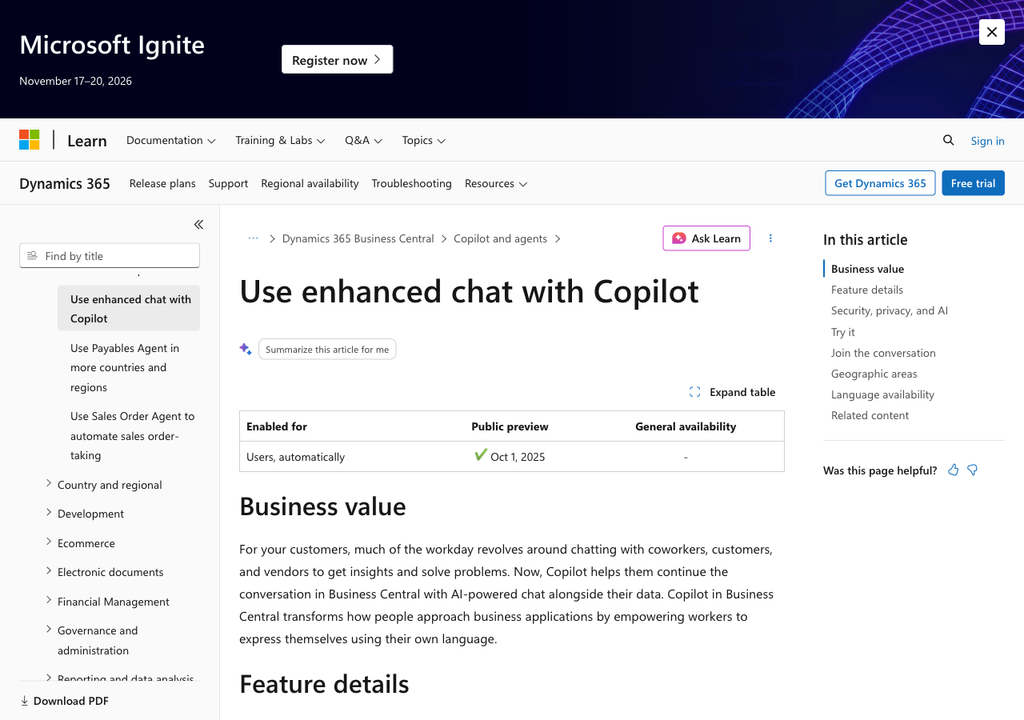
That last one deserves a note. A - in the GA column is Microsoft’s own notation, and it doesn’t mean “GA, date unknown.” It means no GA date has been announced. Once you know that, the release plans get a lot more informative.
The results
| Capability | Status |
|---|---|
| Analysis assist | GA — release plan: Oct 1, 2025 |
| Bank account reconciliation assist | GA — release plan: Oct 1, 2024 |
| Marketing text suggestions | GA |
| Chat with Copilot | Preview |
| Summarize records | Preview |
| Autofill fields | Preview |
| Sales line suggestions | Preview |
| Suggest number series | Preview |
| Suggest item substitutions | Preview |
| Map e-documents to purchase order lines | Preview |
Six of those seven preview pages carry an extra line beyond the standard banner: “This is a production ready preview feature.”
“Production ready preview” is a genuinely useful category and I don’t want to be cynical about it — Microsoft is signalling that you can run this for real, with the caveat that the page still carries the prerelease banner. But it is not the same thing as GA, and if a customer’s procurement or compliance function asks the question directly, “production ready preview” is the answer, not “yes.”
One oddity worth flagging: Suggest item substitutions has no “(preview)” in its page title, but the prerelease banner is right there in the HTML. If you’d checked only the title, you’d have counted it as GA. That’s the whole argument for checking more than one signal.
Chat is the interesting one
Analysis assist and bank reconciliation being GA is unsurprising — they’ve been around, they’re narrow, they work.
Chat is the surprise. It’s the feature that most looks like “Copilot” to a customer. It’s the one that gets demoed. It’s the natural-language front door to the whole system. And it has carried a dash in the GA column since 2024 release wave 2 — through every wave since, without one of them turning into a GA date.
I don’t read that as neglect. I read it as Microsoft being unwilling to make a general-availability promise about an open-ended natural-language surface over a customer’s live ERP data — which, honestly, is defensible. An analysis tab that groups the wrong column is an annoyance. A chat interface that confidently answers the wrong thing about a ledger is something else.
But it does change how you should introduce it. Chat is the thing to show people. It is not the thing to build a training curriculum around and it is not the thing to put in a project scope as a delivered capability.
The language question, and where I got it wrong
While I was in the availability documentation I looked at the language columns, and I’ll be upfront: I wrote something about this that was wrong, didn’t publish it, and had it corrected. It’s worth walking through, because the error is instructive.
What’s true: four of the ten features are validated in a long list of languages that includes German (de-AT, de-CH, de-DE) — Analysis assist, Bank account reconciliation assist, Marketing text suggestions, Summarize records. The other six are validated only in English locales.
What I got wrong the first time was calling those six “English-only.” That is not what Microsoft says, and the difference is the whole point. The actual wording, on the feature pages that carry a “Supported languages” section, is:
This Copilot feature is validated and supported in English only. While it can be used in other languages, it might not function as intended. Language quality might vary based on the user’s interaction or system settings, which might impact accuracy and the user experience.
Chat is an exception worth knowing about: its page has no “Supported languages” section at all. Its English-only status appears only in the availability table.
And under the availability table:
Features can be used in other languages not listed, but they might not function as intended.
There’s no lock. A German-speaking user can open Chat right now and use it in German. Microsoft simply hasn’t tested that the answer is any good, won’t take a support case about language quality, and recommends against it for business-critical processes in production:
Production environments: Use Copilot features only in officially supported languages for business-critical processes
“English-only” implies a barrier that doesn’t exist and would send a consultant off to solve the wrong problem. “Validated and supported in English only” describes a risk you can weigh — and in a German-speaking rollout, weighing it is exactly the conversation worth having.
The second thing I got wrong was a number. I’d written “23 languages.” The multilingual cell contains 20 language names across 39 locale codes. Twenty-three appears nowhere on the page. I’d taken it from a summary of the table rather than the table, which is a lesson I’d rather learn in a draft than in public.
And a third, subtler one: I called it “the ten Copilot capabilities in Business Central.” It isn’t a capability list — it’s an availability table with thirteen rows, ten Copilot features and three agents. Microsoft’s own overview page lists a capability the table omits entirely: “Suggest greenhouse gas emissions in sustainability journals.” So the honest phrasing is “the ten features in Microsoft’s availability table,” not “the ten Copilot capabilities.”
There’s a nice recursive trap in here
Microsoft’s definition of what a supported language actually buys you includes this line:
Full support for features that are no longer in preview
Put that next to the status table above and it folds back on itself. Seven of the ten are in preview. So even for German — a fully supported language on the four multilingual features — “full support” is only unconditional on the three that are GA.
I don’t think that’s a gotcha so much as an accurate picture of where BC Copilot is in August 2026: further along than the preview labels suggest in practice, and less finished than the demos suggest on paper.
What I’d actually tell a customer
If someone asked me tomorrow which BC Copilot features to put in front of production users in a German-speaking company, this is the shape of the answer.
Start with Analysis assist. GA, German-validated, no setup beyond switching the capability on, and it demos in ten seconds — describe the layout you want in plain language and it builds the analysis tab. Worth knowing its documented boundary, though: “Copilot can only access fields that are visible or hidden on the current page or that appear on related pages. It can’t access fields that exist only in the source table.” If a field only lives in the table, Copilot can’t reach it.
Then bank account reconciliation assist. Also GA, also German-validated, and it targets a task people genuinely dislike. It runs after the standard automatch rather than instead of it, and it has a real ceiling: roughly 1,000 open bank ledger entries in the statement window up to 2025 wave 1, roughly 3,000 from 2025 wave 2 onward. Worth checking against a customer’s actual volumes before you promise anything.
Show Chat, frame it as preview. It’s the best feature to demonstrate and the one I’d be most careful about scoping. And the single most useful thing in it isn’t the chat pane at all — it’s that a field tooltip carries an “Ask Copilot” link that explains that specific field and links to the documentation it used. An admin has to switch the Chat capability on first, and for questions about installed add-on apps, Enable Bing Search too. Beyond that: immediately useful, and almost nobody knows it’s there.
Treat the six that are validated in English only as pilot material. Autofill has an Alt+I shortcut and a scripted Microsoft demo built around a vendor named Adventure Works. Sales line suggestions has a Permissive / Balanced / Precise matching selector that materially changes results and that I’ve never seen anyone mention. Both are worth exploring. Neither is something I’d write into a German-language production scope this quarter.
The takeaway
Check the banner, not the brochure.
Every fact in this article came from the page itself — the H1, the prerelease banner in the HTML, the release plan cell, the verbatim caveat. Every mistake I made came from trusting a compressed version of a page instead of the page. Those two sentences are the same sentence, and it applies to whoever is writing your internal readiness assessment too.
BC Copilot is in a better place than a list of preview labels makes it sound. But when a customer asks “is this GA?”, the honest answer for seven of these ten is no — and being the partner who knows that is worth more than being the partner who demos well.
Discover more from Lubenheimer
Subscribe to get the latest posts sent to your email.