Microsoft shipped something significant to Copilot Studio on August 3rd, and I think most people are going to read the wrong paragraph.
The headline is that the GitHub Copilot harness is now generally available for production. It gives Copilot Studio the same coding and reasoning layer that sits behind Copilot Cowork and the GitHub Copilot coding agent. Microsoft describes the target scenario in a phrase worth memorizing: processes with “many steps, many sources, and ambiguous decision points.”
That last part is the real change. Rules-based topics assume you know the decision points in advance. Plenty of the processes we actually get asked about don’t work that way.
But the paragraph I’d have people read twice is further down, and it’s about money. And when I went and read the documentation that shipped alongside the announcement — eight Learn articles, seven of them updated on August 3rd itself — the money part turned out to be bigger than the blog post makes it sound.
What a harness actually is
Microsoft’s own definition is better than any paraphrase I could write, so here it is:
“You design your agent or workflow, while the model you select supplies the reasoning and generation. The harness is a runtime that exists between the two: it determines when to call the model, what components to send it, interprets what comes back, and calls the right tools.”
That’s why this choice reaches so far. The harness sits between your design and your model, and it decides four things you care about: how the work gets done, how much you can automate end to end, what capabilities you get out of the box, and how you’re billed.
Everything in Copilot Studio runs on one. There is no “no harness” option.
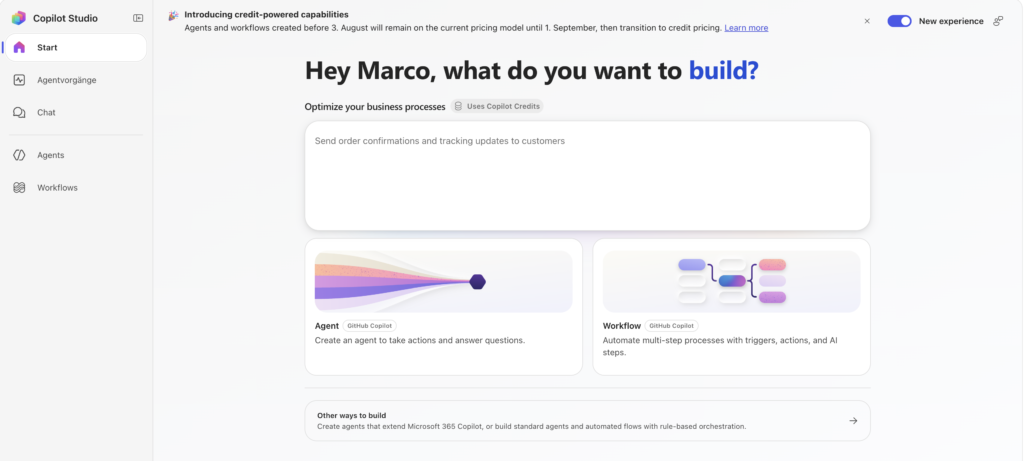
What the new harness actually brings
The GitHub Copilot harness is built on the GitHub Copilot SDK. It can plan, run an agentic loop, use skills, integrate workflows, connect to tools and agents on other platforms, and produce multi-part outputs. Microsoft names Opus 5, GPT-5.6 Sol, and Fable 5 as examples of the frontier reasoning models behind it — and I’d treat that as examples, not a menu, because model line-ups have a shelf life measured in weeks these days. Worth noting: those names appear in the blog post only. The documentation doesn’t list models per harness at all.
The comparison table in the docs is more useful than the announcement, because it says out loud what the other two harnesses don’t do:
| GitHub Copilot | Standard | Copilot Chat | |
|---|---|---|---|
| How it works | “Reasons through a goal on its own, step by step” | follows the topics and rules you define | connects enterprise knowledge to M365 Copilot Chat |
| Recovers from problems | “Retries and finds alternative paths automatically” | follows the paths you’ve built | “Not a focus” |
| Works with files | creates, edits and reasons over Word, Excel, PowerPoint and PDF | “Not a focus” | “Not a focus” |
| Skills and memory | yes | “Not a focus” | “Not a focus” |
| Publishing | internal or external | internal or external | internal only |
Three things sit in the body text rather than the table and matter more than they look. The harness calls tools “across connectors, knowledge, MCP, and connected agents.” It supports memory. And it “runs each task in a secure sandbox governed by Copilot Studio” — which is the sentence I’d lead with in a security review, not the model names.
There’s also a maker story. The agent designer got reworked with the important tools closer to hand while keeping full lifecycle management. The workflow designer gives you a visual canvas with agent nodes and workflow evals. And natural language authoring is announced but not shipped.
Microsoft published a bar chart showing gains in multi-tool use, file analysis, code analysis, and knowledge quality against the Standard harness. Worth noting honestly: there’s no scale on it, no baseline described, no eval definition. It’s a vendor claim about vendor evals. Directionally believable, not quotable as a number.
While we’re here: “skills” now means something specific
The announcement said “skills” without explaining it. The docs do, and the answer is interesting: a skill is a SKILL.md file with YAML front matter (name, description) and Markdown instructions, optionally packaged as a ZIP with scripts, templates and reference documents. The orchestration runtime picks it based on the description.
If that format looks familiar, it should. It’s the same shape as agent skills elsewhere in the ecosystem. Whether they’re actually portable between environments, nobody has said — but structurally, this is not a Microsoft-only construct.
One trap: the Copilot Studio quotas page says 100 skills per agent. That page is explicitly scoped to the Standard harness, where “skills” has meant something else entirely for years. Same word, different thing. Don’t quote one at the other.
Three harnesses, and only one of them is always metered
| Harness | Built for | Billing |
|---|---|---|
| Copilot Chat | extending M365 Copilot Chat with your knowledge | consumption, or included in the M365 Copilot USL |
| Standard | rules-based agents and agent flows — what most agents use today | M365 Copilot license inclusion, then the existing fixed rate card |
| GitHub Copilot | complex, agentic business processes | usage-based, always |
And this is the sentence:
“Agents running on the GitHub Copilot harness use usage-based billing for all work, regardless of Microsoft 365 Copilot licensing.”
If you’ve ever sat in a meeting and said “we’re licensed for Copilot, so agents are covered” — and I’d guess most of us have said some version of that — this is where that stops being true. Not partly. Not above a threshold. For this harness, the M365 Copilot license simply isn’t the meter.
The docs go further than the blog post on what you’re paying for:
“Copilot credits are charged for large language model (LLM) tokens, tools (including knowledge and MCPs), and the harness itself.”
Two things in there deserve a second read.
“Including knowledge and MCPs.” Every MCP call costs credits. If you’re wiring Business Central API pages in as tools — and if you’re reading this blog, you probably are — your tool design is now directly connected to your invoice. That changes the argument for BC’s Dynamic Tool Mode. It used to be the workaround for the 70-tool limit. On this harness it’s also a cost measure: an agent carrying 70 tools in its manifest and using three is paying for context it never touches.
“And the harness itself.” There’s a base load per task before any model or tool gets involved. Combined with runtime as a billing factor, this confirms the rule I keep coming back to from the Cowork side: long processes are expensive even on a small model.
The part almost nobody has flagged yet
Read the billing paragraph to the end and you’ll find this:
“Certain AI-driven maker experiences, like natural language authoring, evaluations, and testing, will also fall under usage-based billing if building with the GitHub Copilot harness.”
The documentation is blunter:
“Unlike the standard harness, which starts billing after publish, the GitHub Copilot harness charges credits from the moment you start building.”
Building costs money now.
That’s structurally new. Until now the line was clean: runtime is billable, development isn’t. If you’re a partner with demo tenants, training environments, and a stack of PoCs that never went live, that’s a budget line of its own — not a rounding error. And evaluations are exactly the thing you want people doing more of, not less.
I don’t think this is unreasonable. Evals on a frontier model are real compute. But it needs to be in your internal cost model before somebody builds forty demo agents for a roadshow.
What happens when the credits run out
This is where the two harnesses genuinely diverge, and it’s the part I’d take into an ops conversation.
Standard harness: enforcement kicks in at 125% of prepaid capacity. Custom agents get disabled — an in-flight conversation finishes, everything after that is rejected. Users see “There is a billing issue.” or “This agent is currently unavailable. It has reached its usage limit.” The tenant admin gets an email and a post in the Power Platform admin center.
GitHub Copilot harness: when an environment has no credits, “any experience that requires credits stops working.” End users lose the agent. And makers lose natural language authoring, preview and testing, and evaluation generation.
Read that again. On the new harness, an empty environment doesn’t just stop the agents — it stops the developers. For a partner running several consultants on one shared demo environment, that’s the sharpest edge of this whole change. One person’s runaway test loop and nobody can build until Monday.
Three things are worth setting up before that happens, all of which the docs spell out and nobody reads:
Allocate capacity per environment. An environment with its own allocation is protected from tenant-level overage. If environments B and C push the tenant to 125%, environment A keeps working as long as its own allocation holds.
Set per-agent monthly limits. Power Platform admin center → Licensing → Copilot Studio → Manage Agents. This caps usage before enforcement, which is a much nicer place to be.
Link pay-as-you-go where you can’t afford a stop. Enforcement doesn’t apply to PAYG environments at all — overage just bills to the Azure subscription. Whether that’s comfort or terror depends on your governance.
What this means for Business Central
For anything beyond the built-in agents, the harness question now comes first — before tools, before prompts, before anything.
| Your BC scenario | Harness |
|---|---|
| “Show me open entries for vendor X” — dialogue, known paths, topics do the job | Standard — stay inside the license inclusion |
| Extending the M365 Copilot Chat experience with BC context | Copilot Chat |
| A multi-step process across BC, a mailbox, a DMS and a legacy system where the right call isn’t knowable up front | GitHub Copilot — and have the credits conversation first |
| Anything that has to produce or read Word/Excel/PDF as part of the process | GitHub Copilot — the docs say the others don’t do this |
| You need your own models, your own hosting, your own knowledge layer | Look at Azure AI Foundry instead |
There’s a detail in the docs I find genuinely funny, in a useful way. Microsoft’s own headline example for the new harness is:
“an accounts payable process, where an agent or workflow reads invoices, matches them to purchase orders, and routes exceptions for approval.”
That is, word for word, the Payables Agent. Which BC already ships, built in.
I don’t read that as a contradiction — I read it as the cleanest available framing of where the line sits. The built-in agent handles the standard case inside BC’s own cost model. The harness is the answer when the process leaves BC — into the DMS, into the mailbox, into the thirty-year-old system nobody wants to touch — and has decision points nobody can enumerate in advance. Rebuild the standard case on the new harness and you’ve built a metered agent where an included one would have done.
Two more BC-specific things from the rate card that I hadn’t seen anyone mention:
Computer-using agents are never included in the M365 Copilot license. The footnote is explicit: “Computer-Using Agents (CUA) usage is not included in the Microsoft 365 Copilot USL.” They bill at the agent action rate. CUA is the recommended answer for exactly the legacy systems around BC that have no API — so if your architecture involves UI automation, it’s in the calculation, full stop.
Reasoning models cost extra on the Standard harness too. The billing runs two meters: the feature rate for the operation, plus text and generative AI tools (premium) at 10 credits per 1,000 tokens for the model’s reasoning. The cheap-versus-metered line doesn’t run neatly between the harnesses. You can be on Standard and still be paying premium rates.
And one caveat I still can’t resolve, which matters for anyone doing BC over MCP: whether the 70-tool limit still applies on the new harness. I went looking specifically for this. The quotas page is explicitly scoped — “This article lists the quotas and limits for standard harness agents” — and it doesn’t list a tool limit at all. There’s no equivalent page for the GitHub Copilot harness. So the limit is neither confirmed nor lifted; the documentation is silent, not contradictory. Keep planning with Dynamic Tool Mode. Silence isn’t permission.
What Microsoft still hasn’t said
I went into the docs expecting to close all four of the gaps I had after the announcement. I closed two.
Still no rate for the new harness. This is the big one. The docs tell you what consumes credits with real precision — tokens, tools, knowledge, MCP, the harness itself — and then decline to say how many. There’s a diagram of “task complexity tiers and their estimated Copilot Credit consumption ranges,” and the numbers exist only inside the image. Meanwhile the Standard harness has a complete published rate card: 1 credit per classic answer, 2 per generative answer, 5 per agent action, 10 for tenant graph grounding, with worked examples down to “7,200 credits per day for 900 customers.” The contrast is hard to miss. The best available tool is the agent usage estimator — whether it covers the new harness yet, I haven’t verified.
“Fair use” is still undefined — but now it has conditions. No quantity attached, and Microsoft explicitly reserves the right to change the limits. What’s new is the conditions, and honestly they’re more useful than a ceiling would be, because they’re binary: the inclusion applies to business-to-employee scenarios where the agent runs under “the authenticated Microsoft 365 Copilot USL user’s identity.” For agent flows, only with the “When an agent calls the flow” trigger — a different trigger on the same flow costs full rate. A customer-facing agent falls out of the inclusion entirely, no matter how small it is.
Switchability: unanswered, and the docs know it. There’s a page called “Access standard harness agents and agent flows” whose introduction promises to explain “when you might switch harnesses, what changes when you do, and how to move between harnesses.” The body then describes a toggle on the homepage. That’s how you access the other authoring experience — it isn’t a migration path. Whether an existing Standard harness agent can be moved to the GitHub Copilot harness is, as far as I can find, written down nowhere.
Governance parity: not addressed. Whether Entra Agent IDs, agent inventory, and the Agent 365 licensing dependency behave identically across all three harnesses isn’t covered in any of the eight pages.
My take
I like this move more than I expected to. The honest read is that Microsoft stopped pretending one runtime fits every agent, and said so out loud: “rather than relying on a single one-size-fits-all approach.” That’s a more mature position than shipping a single harness and quietly making it worse for simple cases. And the sandbox-per-task line, the memory support, the native file handling — that’s a real product, not a rebrand.
But the pricing model turns the harness picker into something it doesn’t look like. It looks like a dropdown. It behaves like an architecture decision with a price tag stapled to it — and unlike most architecture decisions, this one changes the kind of bill you get, not just the size. Standard bills per event, after publish. GitHub Copilot bills per token, per tool, per harness, from your first click in the designer. Those aren’t two price points. They’re two different economies.
So my rule for the next few months is boring and I’m sticking to it: pick the smallest harness that carries the process. A rules-based conversational agent running on the GitHub Copilot harness is a metered agent that could have been an included one. Nobody notices that in a demo. Everybody notices it on an invoice.
Two things to do this week, neither of which takes long. Go check what your existing agents are running on — I’d bet a decent number of teams don’t know yet. And set a per-agent monthly limit on anything in a shared environment, before somebody’s test loop takes the whole tenant down with it.
Discover more from Lubenheimer
Subscribe to get the latest posts sent to your email.