A while back I wrote about building your own agent in Business Central, and the honest summary was: yes, you can — if you’re comfortable with AL, agent tasks, and a fair bit of plumbing. That post aged fast. The interesting shift this year isn’t Build Your Own Agent. It’s Describe Your Own Agent.
Microsoft’s in-product agent design experience — most of us just call it the Agent Designer, the docs call it the AI development toolkit for Business Central — lets you create an agent by writing down what it should do in plain English. No AL project, no VS Code, no deployment pipeline. You open a card, you write instructions, you activate, you hand it a task, and you watch it click through Business Central like a very literal-minded new colleague.
Before you get too excited: this is a prototyping environment, not a shipping vehicle. That distinction matters more than anything else in this post, so let’s get the fine print out of the way first.
What it is, and who it’s for
The Agent Designer extends the same agent runtime that powers the built-in Sales Order Agent and Payables Agent. Same security model, same permission enforcement, same timeline and logs. What’s new is the front door: instead of expressing agent behavior as code, you express it as instructions.
Microsoft is explicit about the target audience, and it’s not just developers. Product owners who want to prototype before committing to AL. Domain experts evaluating what’s even possible. Consultants exploring automation scenarios for a client. And developers who want to validate a use case before writing the first codeunit.
AL isn’t going away. The starting line moved. You used to start a customer conversation with an estimate; now you can start it with a working prototype and then talk about the estimate.
That’s the part I find genuinely exciting. The bottleneck in agent projects was never the AL — it was the fifteen rounds of “no, not quite like that” between the business and the build. Now those rounds happen in a sandbox, in a morning, with the domain expert in the room.
The fine print (read this before promising anything)
Three things come up in every DACH conversation I’ve had about this, so let’s be straight about them.
It’s Business Central online only. The transparency note says it plainly: agents are intended for Business Central online, Microsoft’s SaaS flavor. On-prem and partner-hosted customers are out. If that’s your customer base, this feature isn’t a roadmap item for them — it’s a reason to have the cloud conversation again.
It’s sandbox only. Not “start in sandbox and promote later.” The docs are unambiguous: available exclusively in sandbox environments, never in production. You can use real data — a sandbox copy of production is fine — but the agent you design here never runs live.
It’s still preview. The 2025 wave 2 release plan targeted general availability for May 2026. As I write this, the GA is targeted now for 2026 Wave 2, so October 2026.
On top of that: you need a sandbox on version 27.2 or later, the Custom Agent capability switched on, the AGENT – ADMIN permission set (add AGENT – DIAGNOSTICS if you want to see execution cost and the serialized pages), consumption billing configured for your tenant, and a tolerance for English — it’s the only supported language right now.
Prototyping an agent, step by step
Here’s the flow I’d follow for a first agent. Keep the scope embarrassingly small — one process, one page, one outcome.
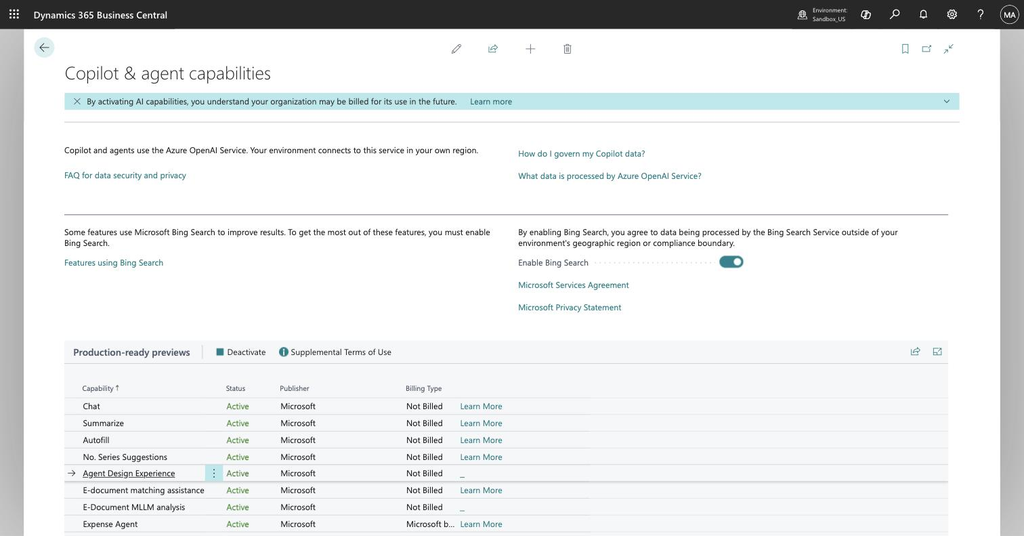
- Enable the capability. In your sandbox, open the Copilot & agent capabilities page and activate Custom Agent. Confirm consumption billing is set up in the admin center, because every agent step burns Copilot credits.
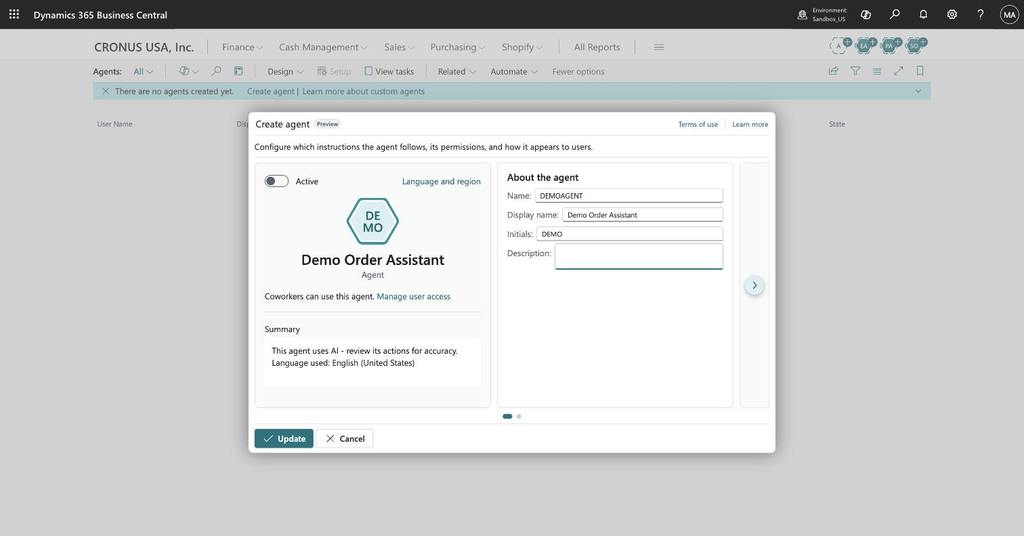
- Create the agent. New agent card, give it a name and a profile. The profile is not cosmetic — it decides which pages, actions, and fields the agent can even see.
- Trim the profile first, not last. Create a dedicated profile for the agent and use page customization to hide everything the agent doesn’t need. Less UI noise, fewer wrong turns, cheaper runs. This is the single highest-leverage step, and it’s the one everybody skips.
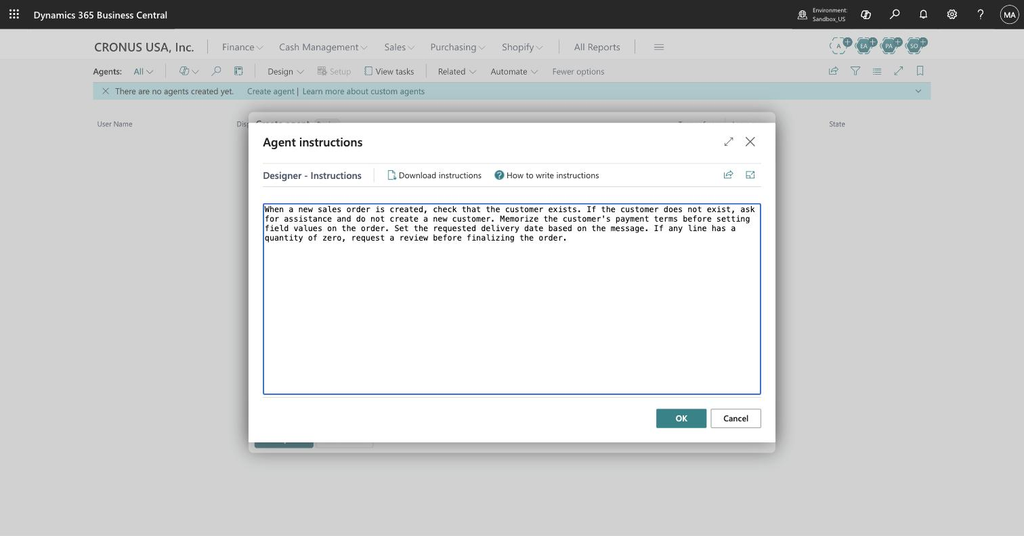
- Write the instructions. This is the actual work — see the next section.
- Set permissions. Least privilege, always. An agent can never have more permissions than the user who created it, which is a nice safety net but also a trap if you build it as a sysadmin and wonder why it behaves differently for someone else.
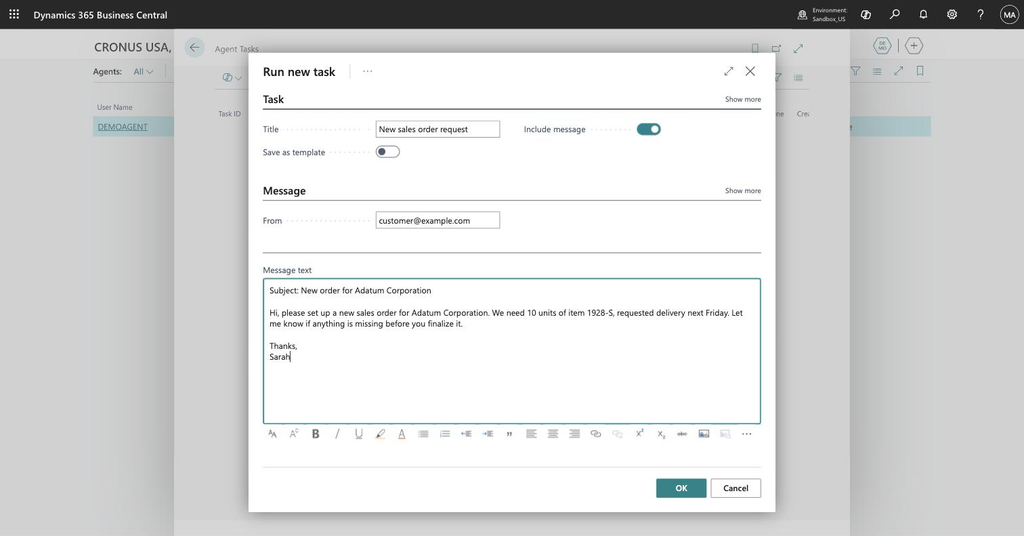
- Activate and give it a task. Tasks can only be added once the agent is active. A task is your trigger, plus any extra context. There are no built-in email or event triggers for custom agents yet, so simulate them: paste an email header and body into the task message and see what the agent makes of it.
- Read the log like a debugger. The timeline shows every page it navigated, every field it read, every decision it made, and every point where it asked for input. When the agent does something daft, the answer is almost always in there — and it’s almost always your instructions, not the model.
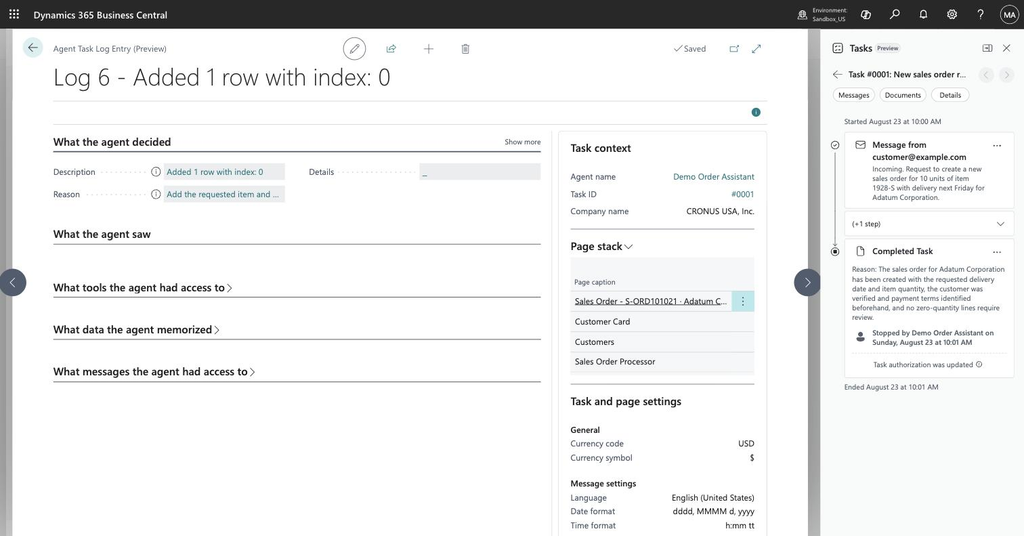
- Iterate, then export. Agent definitions export as JSON — identity, instructions, profiles, permissions. Put them in Git. You’ll want the version history the third time you “improve” the instructions and make everything worse.
Writing instructions that actually work
Instructions are prompts, so everything you know about prompting applies: context, clear expectations, explicit boundaries. But the runtime also understands specific keywords that map to real capabilities. These are the ones worth memorizing:
| Keyword | What it does |
|---|---|
| Ask for assistance | Agent stops and asks a human when it hits trouble |
| Request a review | Agent pauses for confirmation before finalizing |
| Reply / Write an email | Agent drafts a response — outgoing messages always require review |
| Memorize | Agent stores a value for use in later steps |
| Set field | Agent writes a specific field value |
| Use lookup | Agent picks from a lookup rather than free-typing |
| Invoke action | Agent triggers a named page action |
Two things I’d add from practice. First, the agent remembers every action and every list search in a session — but it does not remember page state unless you tell it to memorize. Write that in explicitly or you’ll get an agent that confidently forgets what it just read.
Second, write your edge cases down as instructions, not as hopes. For every rule, ask what a misreading would look like — “if the customer doesn’t exist, ask for assistance; do not create one” — and then test exactly that misreading. An agent without boundaries is like a new hire with root access and no onboarding: eager, fast, and terrifying.
Deployment and governance — what “deploy” really means
Since production is off the table, “deployment” here means graduation. You prototype in the Designer, prove the process, then rebuild it properly with the Agent SDK for AL — which does run in production, from version 28.1. Your prototype isn’t throwaway: the instructions, the profile, the permission set, and the log of everything that went wrong become the specification.
The governance story is decent, and it’s the same one as the built-in agents. Every step is logged and traceable. Permissions are enforced, not suggested. Outgoing messages always require human review. And there’s a cost signal built in — credits are consumed per step, so a badly scoped agent gets expensive in a way you can actually measure. A few limits to plan around: an agent can only work with one list per page, and it can’t use Tell me to find its way, so navigation has to exist as an action or a link in its profile.
My take
What I like about this isn’t the no-code angle — plenty of tools promise that and deliver a click-maze. It’s that the prototype and the production agent share the same runtime. What you learn in the sandbox actually transfers, instead of being an illusion you have to unlearn later.
Spin up a sandbox, enable the capability, and give it a task that would normally take a colleague ten boring minutes. That’s the whole test. Give it a try — I’d genuinely like to hear what your first agent got wrong.
Discover more from Lubenheimer
Subscribe to get the latest posts sent to your email.