I am happy to host a guest post from my fellow colleague Joel Stanciu who is nothing less, than a absolute beast in terms of AI, Agents and Business Central. So proud to have him on my team. Without further ado – the stage is his:
If you’ve been developing extensions for Business Central for a while, you know the feeling.
You search for “post” or “account” or “gen. journal line”, open a procedure that *looks* perfect, see an event… and then realize five hours later that you’ve been extending the wrong damn spot.
The real decision logic?
It’s three levels up, buried in a completely differently named function.
That’s the pain I wanted to kill.
So I built something I call the **MCP** (My Code Pathfinder or whatever name sticks) -basically an agentic layer on top of semantic search, call graphs, and a bunch of reasoning rules so the tool can actually *think* about architecture instead of just grep.
## Real Story: Chasing the General Journal Line Posting Entry Point
Let me show you what it actually does — using a nasty but very real question:
“How do I properly extend General Journal Line posting when it touches accounts?”
(This is tricky on purpose — posting is layered like an onion and full of red herrings.)
### Step 1 – Semantic Search Throws Some Candidates
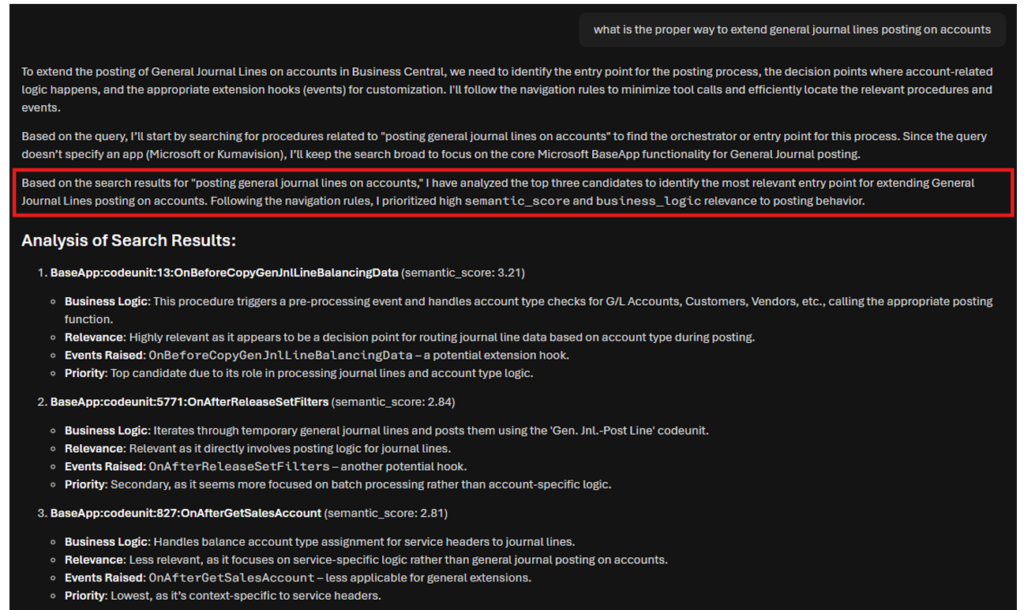
We start broad: procedures related to posting gen. journal lines on accounts.
The top hits look promising:
– OnBeforeCopyGenJnlLineBalancingData
– OnAfterReleaseSetFilters
– OnAfterGetSalesAccount
First one has the highest semantic score and screams “account logic!”
So let’s look closer.
### Step 2 – The Classic Trap: A Beautiful Empty Event
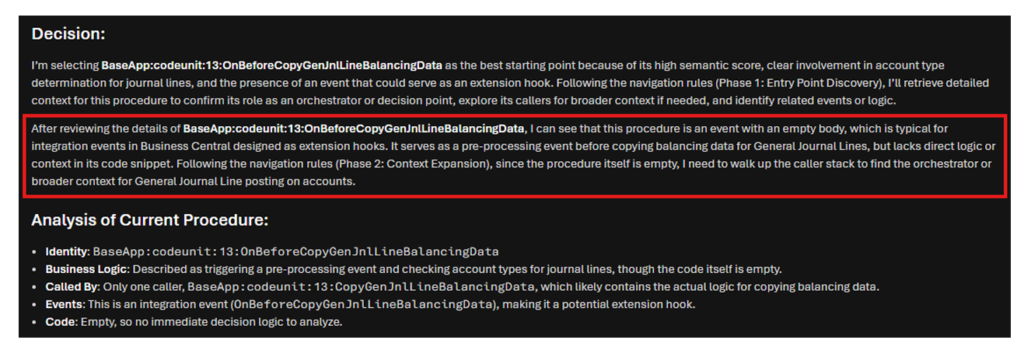
We open `OnBeforeCopyGenJnlLineBalancingData`.
It’s an integration event.
It’s pre-copy.
It mentions accounts.
Perfect… right?
Nope.
The body is **empty**.
It’s just a hook waiting for someone to subscribe — no actual decision logic lives here.
It would be wrong to stop and say “subscribe here!”
Lets take a look at what the agent figures:
### Step 3 – We Climb: Follow the Caller
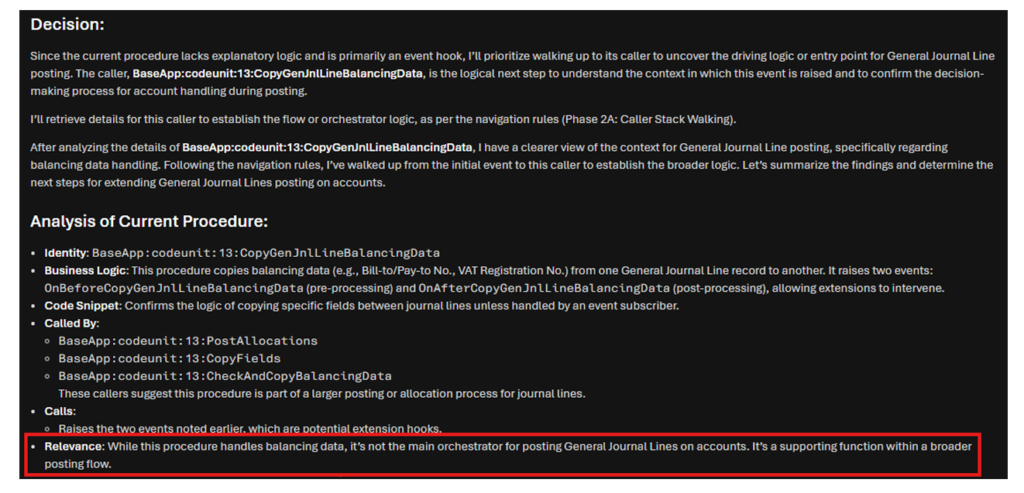
Instead of committing, we ask: who calls this?
Turns out it’s `CopyGenJnlLineBalancingData` — which actually does the field copying (VAT, Bill-to/Pay-to, etc.).
Better… but still not the boss.
### Step 4 – Getting Warmer: Allocation Layer
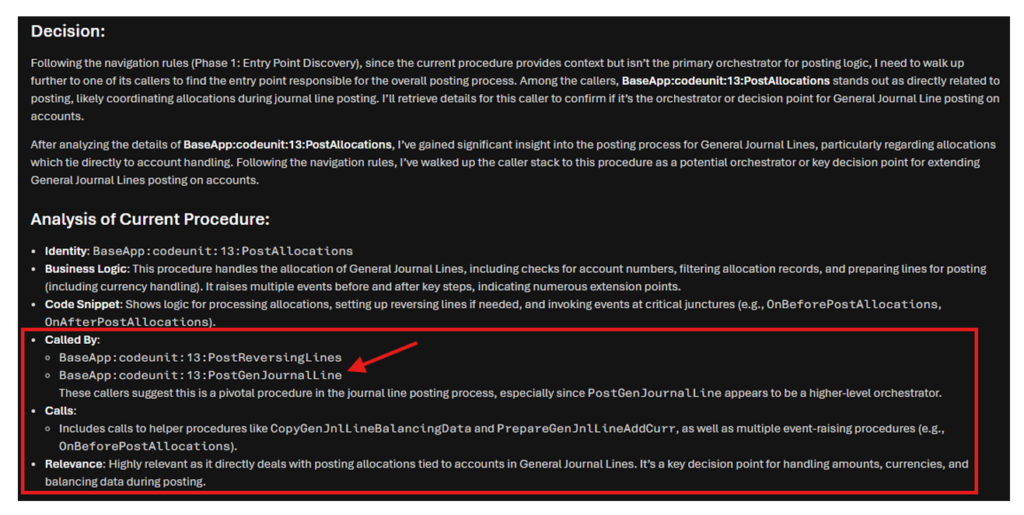
Next hop up: `PostAllocations`.
Now we’re talking allocations, currency prep, reversing lines, multiple before/after events — this is clearly part of the posting engine.
But is it *the* coordinator?
Not quite.
### Step 5 – Jackpot: The True Orchestrator
One more level: `PostGenJournalLine`.
This is it.
– It drives the whole line posting flow
– Routes depending on account type
– Calls all the helpers we saw below
– Raises the important integration events at the right moments
This is where you want to understand the architecture — and where the best extension decisions usually live.

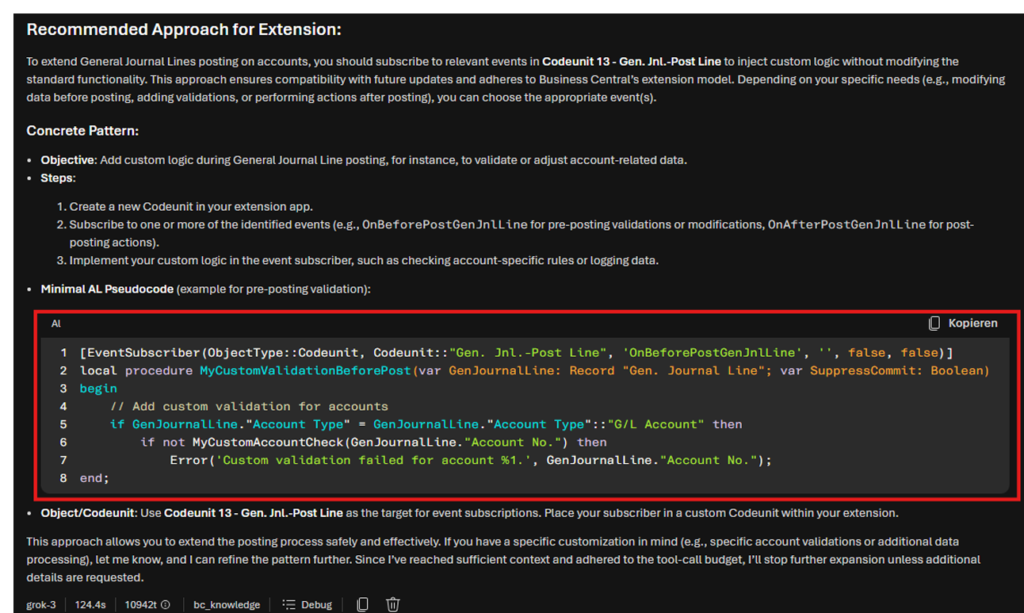
### Final Output: Sensible Extension Advice
From here the tool can finally give concrete, safe advice:
– Which events actually matter
– Example subscriber pattern
– Where to inject validations, modifications, logging, etc.
—
## But How?
The difference is reasoning, not just search.
Normal symbol search gives you:
– “This procedure is called from X”
This could’ve been correct (and from my testing it often already is — the agent would’ve stopped much sooner if it were).
We could’ve tweaked the descriptions or refined the query to directly hit the right procedure, but you can’t always find the needle in the haystack that way.
So I intentionally chose this walk to prove that with this MCP, we don’t have to.
The agentic reasoning combined with the MCP is a huge help in keeping our sanity intact.
The MCP tries to answer:
– “Where does the **business decision** actually live?”
– “Is this event cosmetic or mission-critical?”
– “Should I stop here or keep climbing?”
And it does all that in ~10k tokens total — which for multi-hop codebase reasoning is honestly ridiculous (in a good way).
—
## Under the Hood: How the MCP Is Actually Built (and How You Could Build Something Similar)
People often ask: “Ok, but how is this thing actually powered? What stack? Could I replicate it?”
Short answer: yes please.
The whole system is a multi-stage pipeline that turns raw Business Central .app files into a queryable knowledge base + graph that the agentic layer (the “MCP server”) can reason over.
Here’s the high-level architecture and flow:
1. **Extraction & AST Parsing**
Start with .app files (BaseApp, SystemApp, your own extensions…). A custom extractor pulls out AL source as JSON ASTs. From there, we generate a clean list of every procedure (name, signature, location, etc.) in JSONL format.
2. **Static Analysis / Relationship Enrichment**
Pure code analysis (no LLM yet) walks the ASTs to build the call graph: who calls whom, what tables/records are referenced, which events are published or subscribed to, variables passed around. This gives bidirectional relationships (`called_by`, `calls`) and is the foundation for stack walking.
3. **Business Context via LLM**
Here Azure OpenAI (model-router) comes in. For each procedure we feed the full context (code, callers/callees, events, references) and ask for a concise, human-readable business description. Checkpointing + batch + concurrent calls make this feasible even for ~100k procedures.
4. **Semantic Embeddings**
Using text-embedding-3-large (or small), we generate vectors for procedure name + description + key snippets. These go into a separate file for later use.
5. **Hybrid Search Index (Azure AI Search or QDRANT)**
The enriched procedures + vectors are uploaded to Azure AI Search. This enables fast semantic + keyword hybrid queries — perfect for the initial candidate discovery phase. (Azure handles HNSW indexing, semantic reranking, and hybrid fusion out of the box.)
6. **Unified Knowledge Graph (NetworkX)**
All relationship data is collapsed into a single directed graph (pickle file). Nodes = procedures + objects (tables, codeunits…). Edges = CALLS, REFERENCES, BELONGS_TO, etc. We then enrich each procedure node with a short code snippet pulled from the original source. This graph powers the caller/callee walking and context expansion.
7. **MCP Server (Node.js + Python bridge)**
A lightweight Node.js server exposes MCP-compatible tools (`search_code`, `get_procedure_details`). For graph access it calls out to Python subprocesses that load the pickle file. The agent (Grok/Claude/etc.) talks to this server to perform the phased reasoning you saw in the example.
**Tech choices summary**
– **Embedding & LLM** → Azure OpenAI (model-router + text-embedding-3-large)
– **Vector + hybrid search** → Azure AI Search (native vector support + semantic reranker)
– **Graph** → NetworkX (simple, Python-native, pickle serialization)
– **Server** → Node.js (for MCP protocol) + Python bridge for heavy lifting
– **Concurrency & resilience** → Built-in checkpoints, incremental saves, signal handlers everywhere
**Extensibility & replication notes**
The full pipeline takes ~2 hours for a decent set of apps on a beefy machine (with good concurrency), but incremental runs are much faster. All scripts live in a monorepo with clear stage separation — so you can run just one part if something changes.
If you’re serious about replicating or forking this, I’d love to open-source the skeleton (minus any proprietary bits) — let me know.
—
## Big Thanks
Huge shoutout to **Marco Lubig** who spent real hours throwing nasty scenarios at early versions, arguing about ranking heuristics, and helping me tune when to stop walking vs. when to dig deeper.
Real senior feedback is worth 10× any synthetic benchmark.
—
## Bottom Line
AL isn’t hard because of syntax.
It’s hard because of **architectural discovery** in a huge, event-heavy, layered codebase.
I wanted a tool that navigates like a tired senior dev at 11 p.m. — but doesn’t get tired.
That’s what the MCP is trying to be.
If you fight the same battles in Business Central extensions, I’d love to hear your war stories — maybe we can make it even smarter.
Happy coding (and less Ctrl+F-ing),
Joel Stanciu
Discover more from Lubenheimer
Subscribe to get the latest posts sent to your email.